Frontmatter Solo
Hand off in an afternoon.
Your Astro project becomes a server-side render pack — Twig or plain PHP — designed for backend integration. No rewrite. No runtime.
CLI + Desktop app (macOS 12+ · Apple Silicon) · Twig + PHP output · $49 one-time
You finished the Astro project.
The backend developer is waiting.
Now someone has to explain every component, every prop, every field name.
Solo makes the handoff explicit.
<!-- Astro component — literal props only -->
<Hero headline="Hello Solo" />
{# Generated by FM Solo — partials/hero.html.twig #}
<section class="hero">
  <h1>{{ fm.props.headline }}</h1>
</section> <?php // Generated by FM Solo — partials/hero.php ?> <section class="hero"> <h1><?= htmlspecialchars($fm['props']['headline']) ?></h1> </section>
Your frontend
Keep building in Astro
No migration. Solo reads your constrained Astro project and extracts the render structure at build time.
Output format
Twig or plain PHP
One flag: --adapter twig or --adapter php. Same structure, different syntax.
Architecture
Build-time only
Solo runs once at build time. The output is static files. No runtime. No API. No coupling.
Handoff
Explicit by design
Every prop becomes a documented variable. INTEGRATION.md tells the backend developer exactly what to connect.
What you get
output/
├─ pages/
│  └─ index.html.twig
├─ layouts/
│  └─ base.html.twig
├─ partials/
│  ├─ hero.html.twig
│  └─ section.html.twig
├─ manifest.json
├─ INTEGRATION.md
├─ frontmatter.build.json
└─ preview-php/           ← optional
Integrate into your backend. The structure and variable contract are already defined.
Frontmatter Solo is not a CMS.
It is a build-time extraction tool. It transforms a constrained Astro project into an explicit rendering specification — a stable, documented contract between your frontend and any backend.
Twig and PHP are output formats. Same intermediate representation, different syntax. You choose at build time.
What this is not
- a CMS or runtime
- a universal Astro adapter
- a backend data layer
- a plugin system
- a managed service
Solo works with constrained Astro projects. Run npx @withfrontmatter/solo-check first to check compatibility for free.
Frequently asked questions
What kind of Astro project does Solo accept?
Solo requires a constrained Astro project: one layout per page, literal props only (string, number, boolean, or null), global CSS or SCSS compiled globally, and static images from public/. It does not support client:* islands, Markdown pages, nested layouts, scoped CSS, or the Astro image pipeline.
What does the data contract look like?
Solo uses a fixed namespace: fm.site, fm.page, fm.data, and fm.props. Pages and layouts read fm.site, fm.page, and fm.data. Partials read fm.props. In PHP the same keys are accessed as $fm['props'].
What is not generated by Solo?
Solo does not generate backend logic, data fetching, CMS wiring, routing, authentication, or form processing. It generates templates and a variable contract. Backend integration remains your responsibility.
Can I use dynamic props like headline={page.title}?
No. Solo v1 requires literal props only: string, number, boolean, or null. Expressions like headline={page.title} will fail validation with error E201. This is a deliberate constraint.
Does it work with my existing Astro project?
Only if your project follows the Solo contract.
Run npx @withfrontmatter/solo-check --root . first to check compatibility for free.
Solo will report unsupported patterns with actionable error codes (E201, E203, E230, etc.).
What is the Starter for?
The public starter project is a reference Astro project built to the Solo contract. It is also included in the Solo CLI package download. Starting from it guarantees a clean render pack on the first run.
Free · Open source
Check compatibility before you buy.
solo-check is a free CLI validator. It scans your Astro project against the Solo contract and tells you exactly what is and isn't compatible before you purchase anything. Use --help-ai if you want the packaged AI workflow.
npx @withfrontmatter/solo-check
✓ Command copied
Example output
✓ src/pages/index.astro — OK
✓ src/layouts/Base.astro — OK
E201 src/pages/contact.astro:13 Non-literal props used in component Hero.
  Fix: Use only string, number, boolean, or null props in Solo v1.

──────────────────────────────────────────
1 error · 0 warnings

Tip: use the AI workflow to fix these errors automatically.
     npx @withfrontmatter/solo-check --help-ai
──────────────────────────────────────────
Exit 0 means your project is ready for Solo. Use npx @withfrontmatter/solo-check --help-ai if you want the packaged AI fixing workflow. View on GitHub ↗
Prefer a UI?
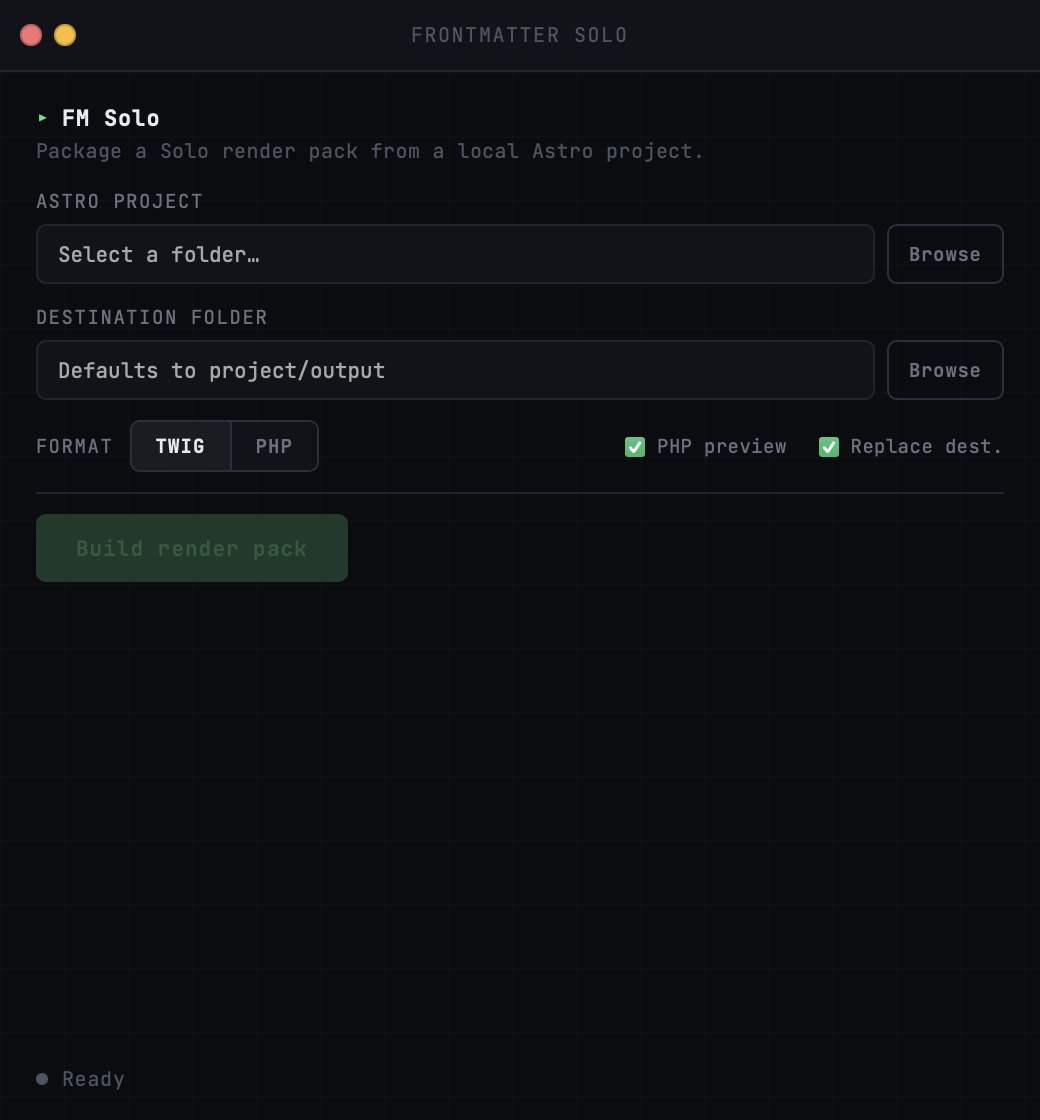
Frontmatter Solo also ships as a macOS desktop app. Same Solo runtime, local UI, same Twig and PHP output.
$49
One-time purchase. No subscription.
- CLI — macOS, Linux, Windows (Node)
- Desktop app — macOS 12+ · Apple Silicon
- Twig output
- Plain PHP output
- Starter reference project included
- INTEGRATION.md auto-generated
Provided as-is. Requires a Solo-compatible Astro project. No guarantee of compatibility with all project configurations. Support is best-effort.